

- Case
- Discovery & strategy
- User flow & customer journey
- UX/UI design
- Accessibility audit
- Content & storytelling
A website that works for every donor
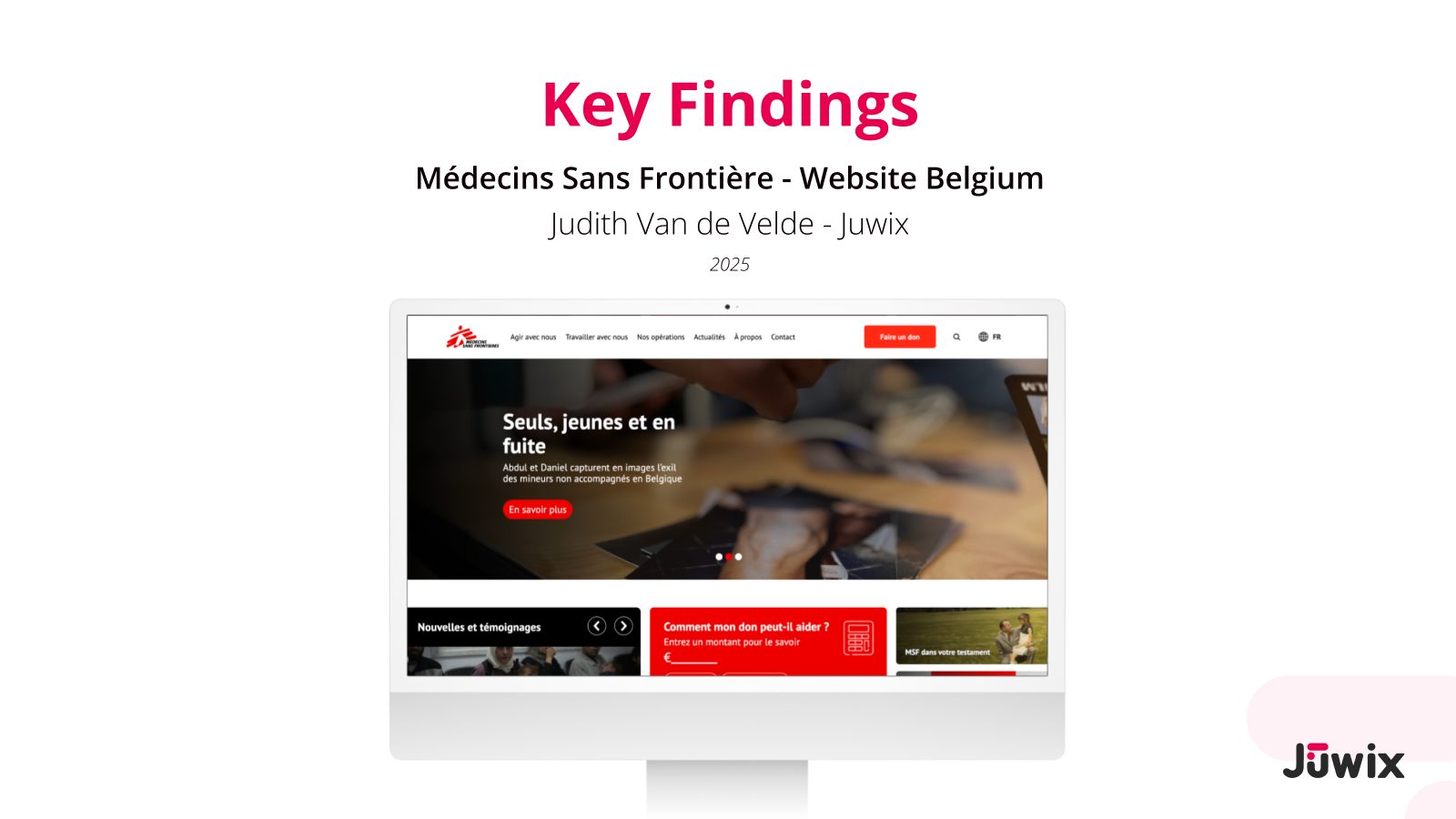
Doctors Without Borders Belgium (MSF) had just rebuilt its website with a new page builder. We looked at it with their staff, with donors and with assistive technology, and turned what we found into one action plan for developers and designers.
- Client
- Médecins Sans Frontières / Artsen Zonder Grenzen Belgium
- Website
- msf-azg.be (being updated)
- Sector
- Non-profit, humanitarian medical aid
- Period
- From July 2025 to September 2026
- Our role
- UX research, accessibility audit, content strategy, UX/UI design and handover
- Team
- Judith Van de Velde (Juwix) with MSF’s digital and communication teams
- Standards
- WCAG 2.1 AA as the target, WCAG 2.2 criteria included, European Accessibility Act
- Languages
- Dutch and French website
- Tools
- FigJam, Figma, VoiceOver, keyboard, WAVE, axe, Lighthouse
In short
- Challenge: a new modular website, but not every building block was accessible. Most donors are older, and MSF wants to reach new, younger supporters.
- What we did: 6 stakeholder interviews, 2 donor interviews, a survey, desk research, 4 personas, a benchmark and an audit of 72 WCAG criteria on pages and components.
- Result: a prioritised action plan for developers and designers, a fix guide for 29 components, and an accessible component library with page templates for desktop and mobile. Since then, MSF has been putting the new designs live step by step. Some components are still being improved for accessibility, and some pages still use the old templates.
The challenge
MSF Belgium had rebuilt its website with a component-based page builder. Teams could now make pages faster and more consistent. But a first check showed that some components were not accessible. That is a risk under the European Accessibility Act, and it shuts out people who use a screen reader, a keyboard or zoom.
There was a second challenge. Most donors are older. MSF wants the website to work for younger, digitally fluent people too: people who expect less friction, clear language and proof of impact.
MSF did not want a new system. The question was how to improve what already exists: the components, the flows and the content.
“How can we create an MSF website experience that is accessible, emotionally compelling, legally compliant and discoverable, especially for new and younger donors?”
Goals
| Goal | How we approached it |
|---|---|
| Find accessibility barriers | Check pages and components against WCAG 2.1 and 2.2 (AA, and AAA where useful) |
| Make components safe to reuse | Audit each component separately, so a fix works on every page that uses it |
| Clearer flows and copy | Interviews, personas and a survey on what donors expect and what puts them off |
| Better findability | SEO scan of headings, metadata, alt text and link texts |
| Clear next steps | An action plan that developers and designers can pick up |
Approach
Everything lived in one shared FigJam board: the research, the audit and the decisions. MSF teams could follow along and comment at any time.
Set up
We did: research request and problem space with MSF’s digital and communication teams, and a shared research board.
Listen to the organisation
We did: 6 stakeholder interviews across 6 departments, desk research on Belgian giving, a benchmark of MSF Netherlands and MSF France.
Understand donors
We did: 4 personas mapped to the donor journey, 2 in-depth donor interviews, a short survey, an audit of today’s content formats.
Audit
We did: WCAG check of the Dutch and French pages, the press site and the donation platform; a separate check per component; an SEO scan.
Findings
We did: a key findings report and an action plan split for developers and designers.
Design and handover
We did: a fix guide per component, an accessible component library and page templates for desktop and mobile in MSF’s Figma file.
Research
| Method | With whom or what | Size |
|---|---|---|
| Stakeholder interviews | SIM management, digital marketing, legacies, donor services, acquisition, HR | 6 sessions, about 10 people |
| Donor interviews | Potential and former donors, with a 5-part interview guide | 2 in-depth |
| Survey | What people expect on the homepage, and what puts them off | Online, short |
| Desk research | Reports on giving behaviour and legacies in Belgium | 4 reports |
| Benchmark | MSF Netherlands and MSF France homepages | 2 sites |
| Content audit | Today’s formats (donation page, impact, FAQ, legacies, annual report) and the page inventory | Whole site |
What the organisation told us
- Nobody owns the website as a whole. Several teams add content, so the homepage gets crowded.
- The site has over 500 pages, many of them outdated and rarely visited.
- Impact is hidden in long reports. Results and finances are there, but hard to find.
- The donor journey is built for regular donors. There is little for people who want to help in other ways first.
- The tone feels institutional. Teams want a warmer, more community-like voice.
- The design system needs work: not every block was designed to be accessible.
What donors told us
Two in-depth interviews, one with a woman in her fifties in Flanders and one with a man in his late twenties in Antwerp. Both want proof of what their money does. One dislikes being asked for money in public. The other distrusts staged emotion, watches overhead closely and finds causes through friends, Google and podcasts.
Personal stories, short videos and live updates made people feel the most connected. Written reports made them feel the least connected.
All interviews are anonymised on this page. The survey went to MSF donors, to visitors through a pop-up on the website, to Facebook groups and by email.
Personas
MSF had no personas yet. We made four “go-to” personas, based on the interviews and the desk research, and placed each on the donor journey: from awareness to a legacy.
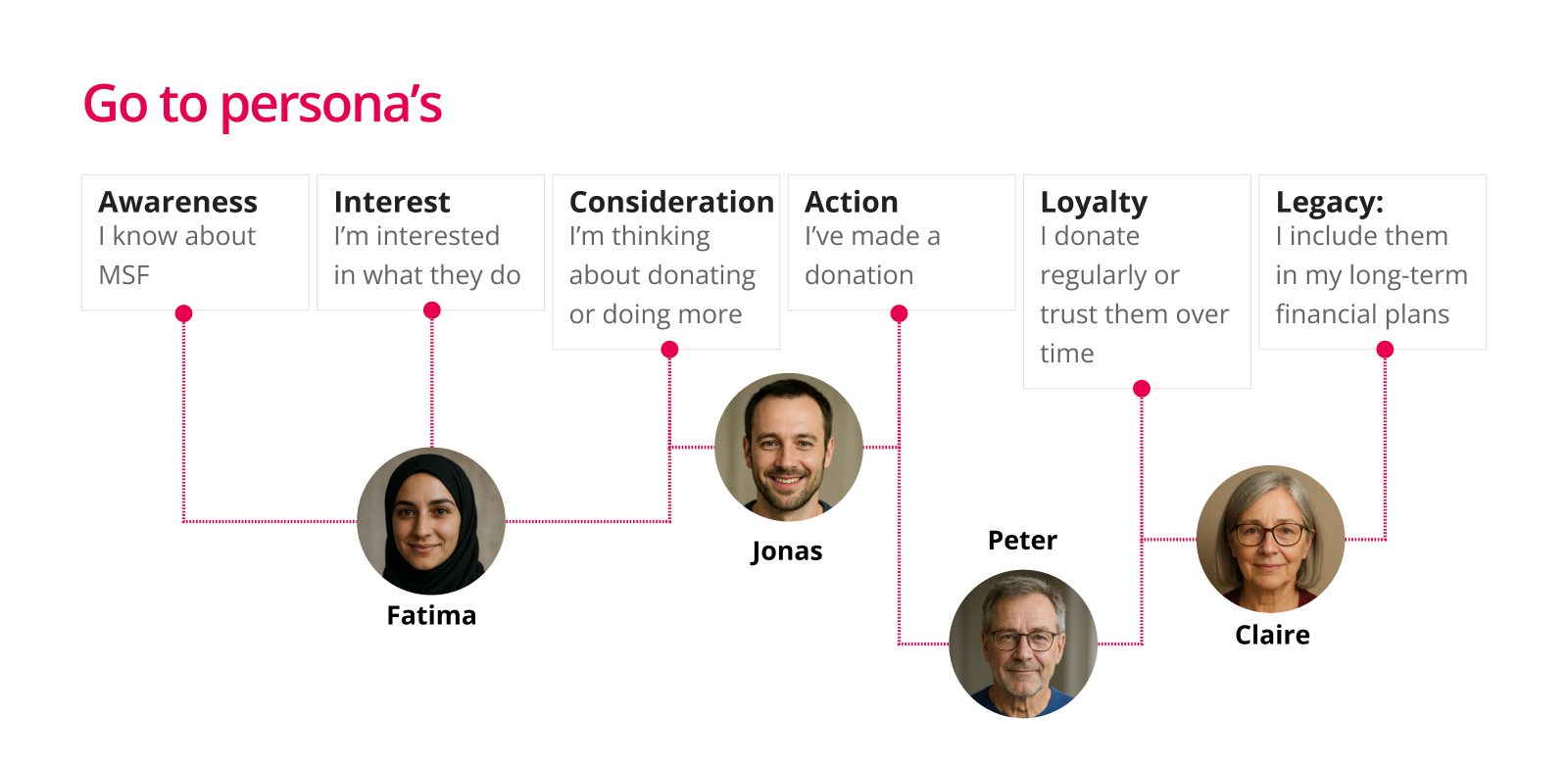
Fatima 41, pharmacist, Brussels · French, Arabic, English
Awareness → interestHas not given yet and does not know where to start. Scrolls past logos and numbers; wants to see people like her. Needs mobile-first, warm French content.
Jonas 31, freelance designer, Leuven · Dutch, English
Consideration → action“Don’t give me guilt. Give me clarity.”
Needs a fast mobile page, a visual impact calculator and short video. No PDFs.
Peter 54, HR manager, Ghent · Dutch
Action → loyalty“I need to know what €25 a month actually does.”
Gave during crises, not every month. Needs a simple monthly-giving explainer, a tax FAQ and proof of where the money goes.
Claire 69, retired psychotherapist, Namur · French
Loyalty → legacy“Let me take my time.”
Quietly thinking about a legacy. Needs calm French pages, a step-by-step legacy guide and a clear FAQ. No pressure.
What we found
- Navigation
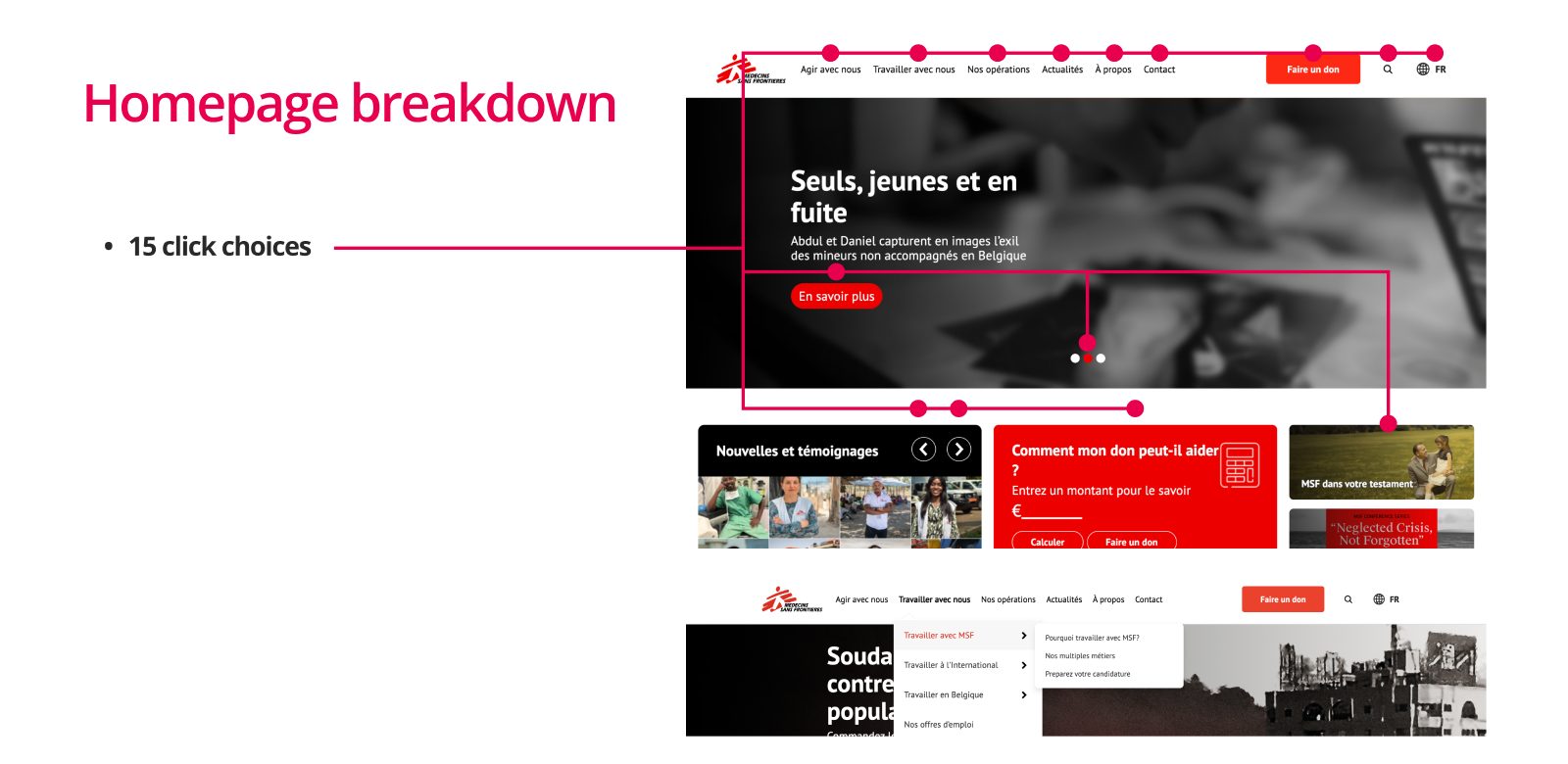
Too many choices on the homepage
- Evidence
- 15 things to click before you scroll. A comparable homepage we studied offered 5.
- Why it matters
- Every extra choice slows people down (Hick’s law). The donate button has to compete with everything else.
- Content
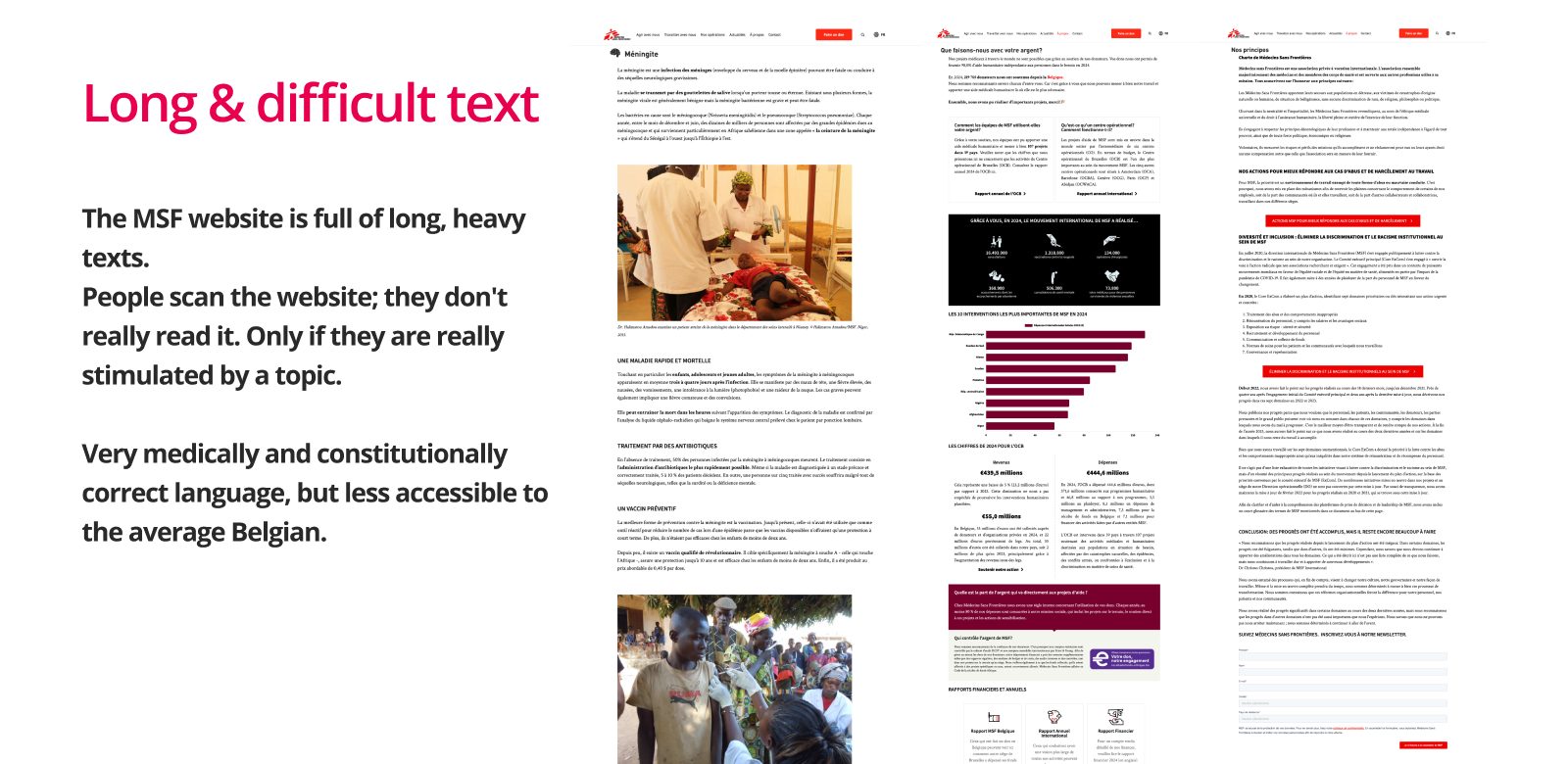
Long, difficult text
- Evidence
- An average of 36.9 words per sentence on the page we scanned. Medically and formally correct, but hard for the average reader. 58% of survey answers said long reports don’t work for them.
- Why it matters
- People scan. They only read on when a topic grabs them. Long text also excludes people with dyslexia, low literacy or limited Dutch or French.
- Accessibility
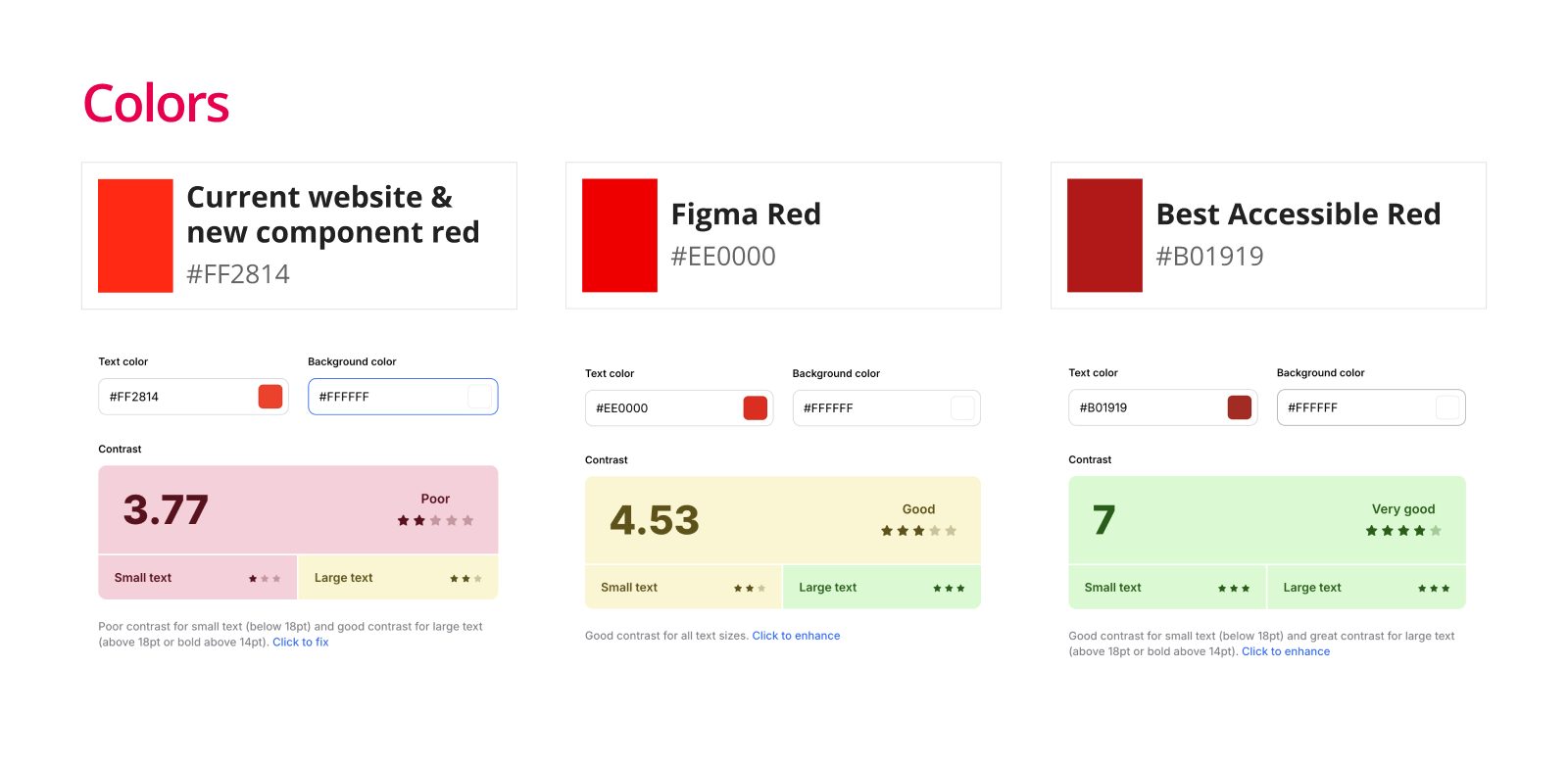
The brand red fails contrast
- Evidence
- White text on the website’s red (#FF2814) reaches 3.77:1. WCAG asks 4.5:1 for normal text.
- Why it matters
- The red is used on the main buttons, including the donate button. People with low vision or a bright screen can miss them.
- Accessibility
Keyboard and screen reader barriers
- Evidence
- Submenus don’t open with the keyboard. No skip link. A homepage slider moves on by itself with no pause button. VoiceOver skips some card content, and some buttons have no name.
- Why it matters
- Someone without a mouse cannot reach parts of the menu. Moving content without a pause fails WCAG 2.2.2.
- Consistency
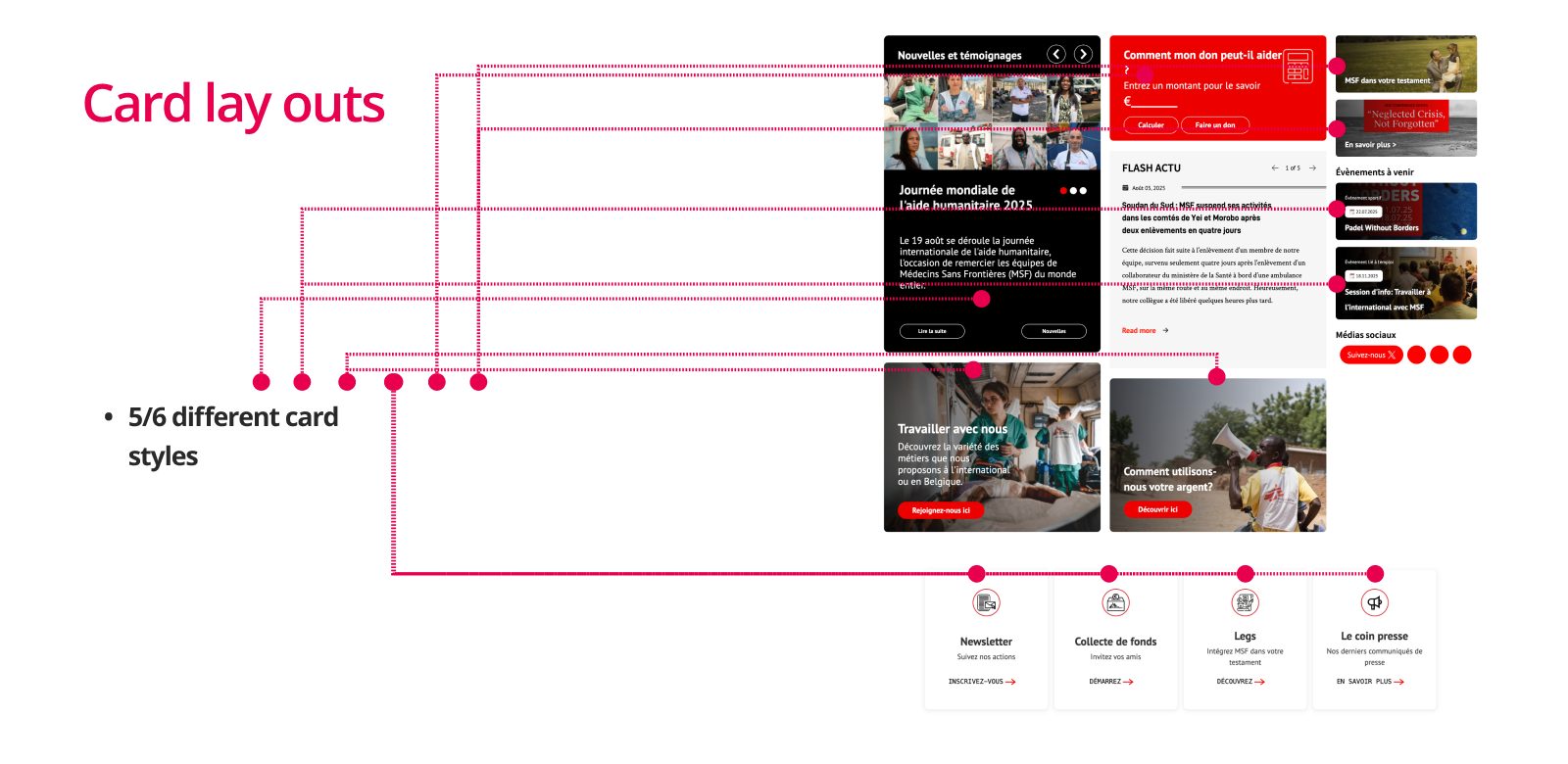
Five or six different card styles
- Evidence
- The homepage alone uses 5 to 6 card layouts. The donation platform has a different header and footer, and form styles differ.
- Why it matters
- People have to relearn the page at every block. Each style is also one more component to keep accessible.
- Trust
Impact is hard to see
- Evidence
- Impact is told in text only, and the annual report is a PDF. 72.7% of survey answers expect “where your money goes” on the homepage.
- Why it matters
- New donors want proof before they give. Without it, they leave or give elsewhere.
From findings to action
A long list of problems does not help a team. So we wrote a fix for each problem and split them by who can solve it: developers or designers. Each item links back to the WCAG criterion it is about.
| WCAG | Problem | Fix | Track |
|---|---|---|---|
| 1.4.3 | Button text on red: 3.77:1 | A darker red or a bolder font | Design |
| 1.4.11 | Red social icons on a red background | Icons need 3:1 against their background | Design |
| 2.1.1 | Submenus don’t open with the keyboard | Give keyboard focus the same effect as hover, so submenus open | Development |
| 2.2.2 | Slider moves on its own, no pause | A visible pause or stop button that works with the keyboard | Development |
| 2.4.1 | No skip link | A skip link at the top of every page, visible on focus | Development |
| 2.4.4 | Many “En savoir plus” links without context | A title in the card, or a specific text like “Read more about [topic]” | Design |
| 3.2.5 (AAA) | The donation flow opens new windows without warning | Only open a new window when the person chooses it, and say so | Development |
| 3.3.1 | An invalid email address is accepted | Check the email format and show a clear, accessible error message | Development |
The action plan put 19 criteria first. We checked the components separately, so one fix in the page builder repairs every page that uses it.
| Component | What we found | Status |
|---|---|---|
| Timeline, pager, language selector | Previous and next buttons have no accessible name | To fix |
| Focus indicator | Only a small dotted line | To fix |
| Icons (small, extra small) | Too small to tap; 24 px works | To fix |
| Form fields | No error on invalid input | To fix |
| Breadcrumb | The component exists but is not used on pages | To use |
| Accordion | Large enough target (323 × 45 px), works | Conform |
From finding to check
Every fix can be traced from the problem to the way you check it. One example:
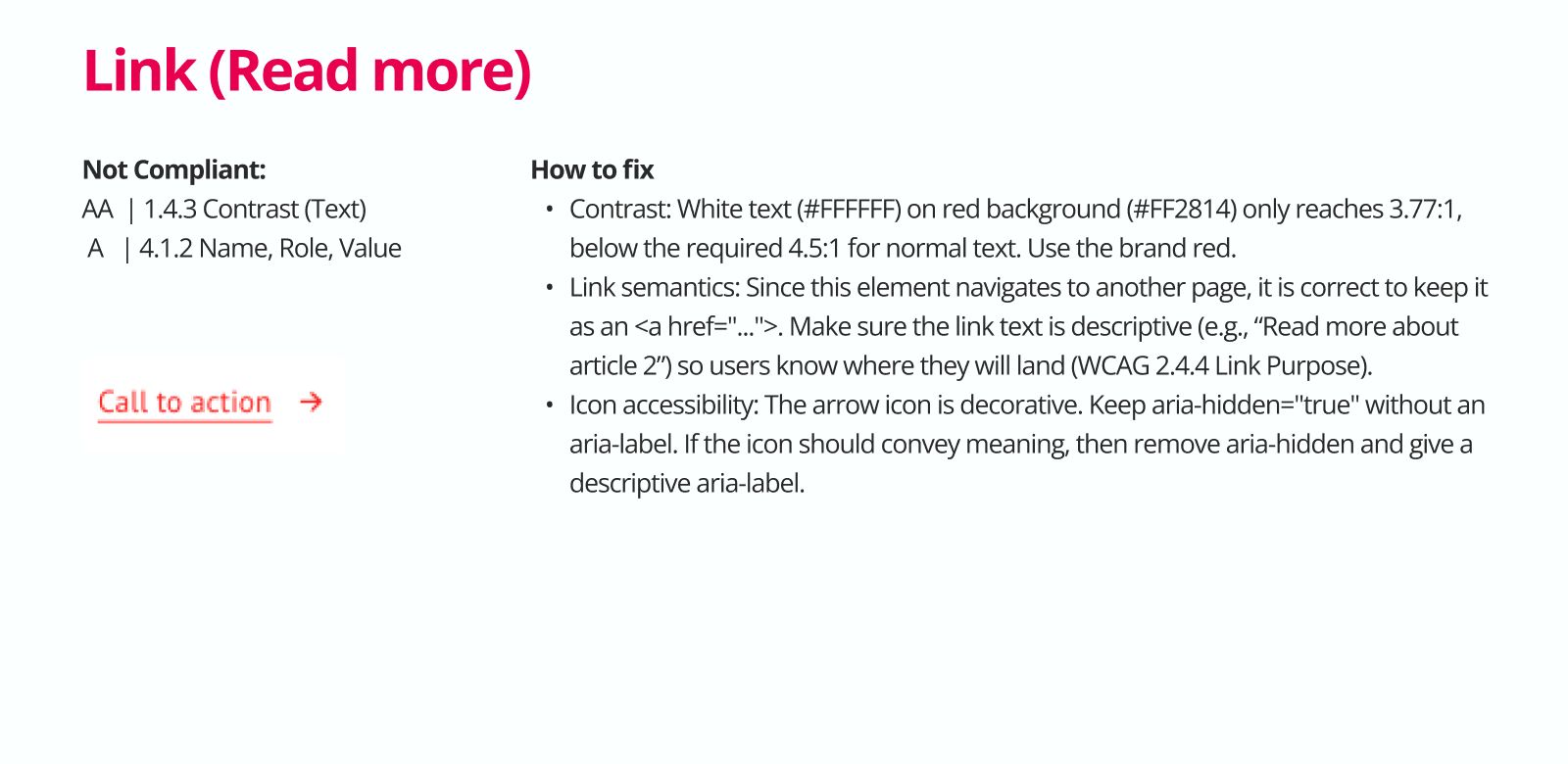
- FindingDonate button text on #FF2814 reaches 3.77:1
- RequirementWCAG 1.4.3: at least 4.5:1 for normal text
- Design decisionUse MSF’s brand red #EE0000 from the Figma library: 4.53:1
- CheckContrast test on every red text and button
Design: templates and components
We first sketched a homepage concept, but we did not take it further. MSF did not need one new page. It needed building blocks that work on every page. So we continued in MSF’s own Figma file and turned the findings into an accessible component library and a set of page templates, each for desktop and mobile.
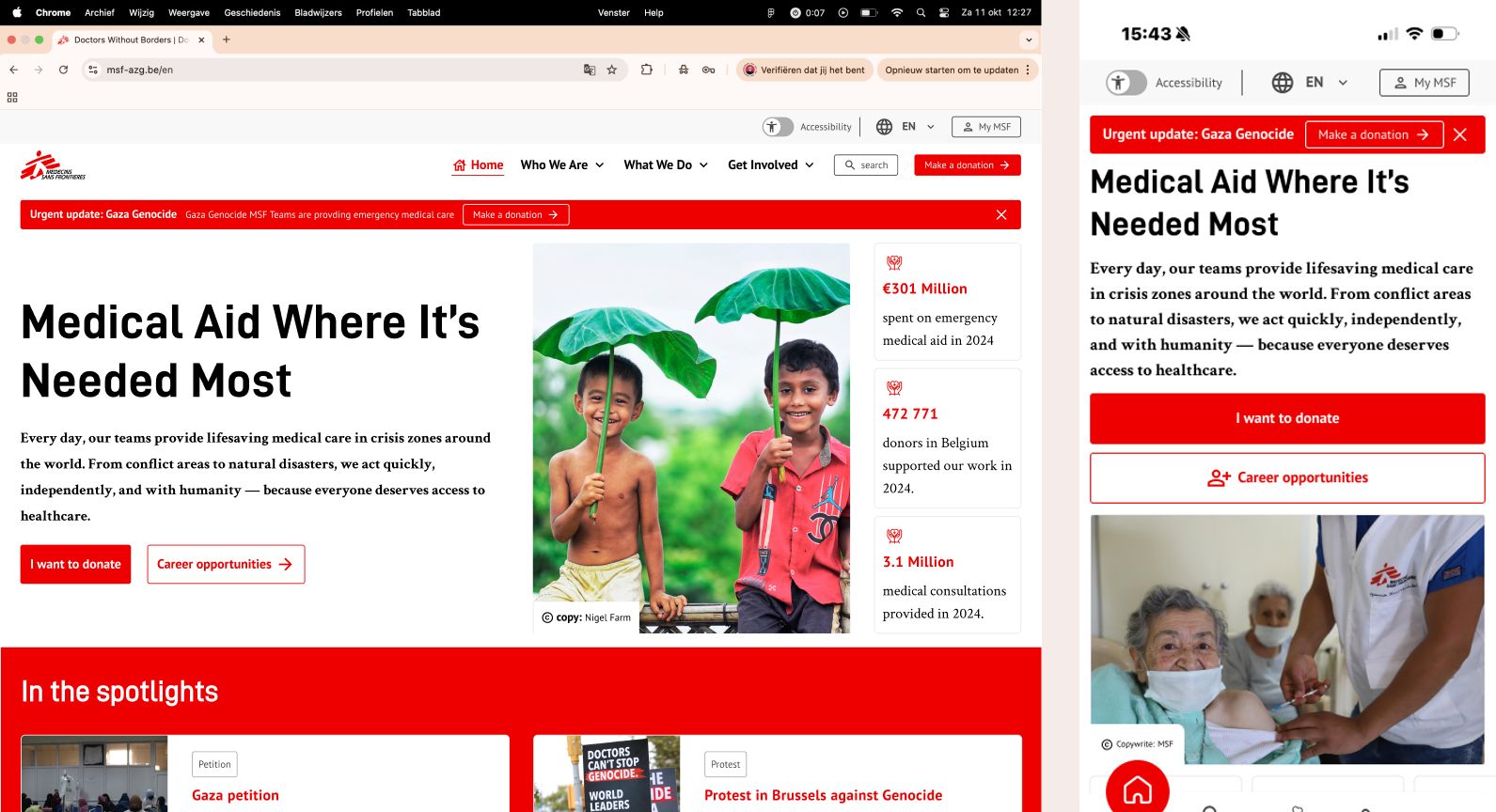
What changed in the design
- Fewer choices at the top. One message and two buttons, instead of a slider and 15 things to click.
- Impact you can see. Key figures next to the headline, and a page that shows how the money is spent, with bars and numbers.
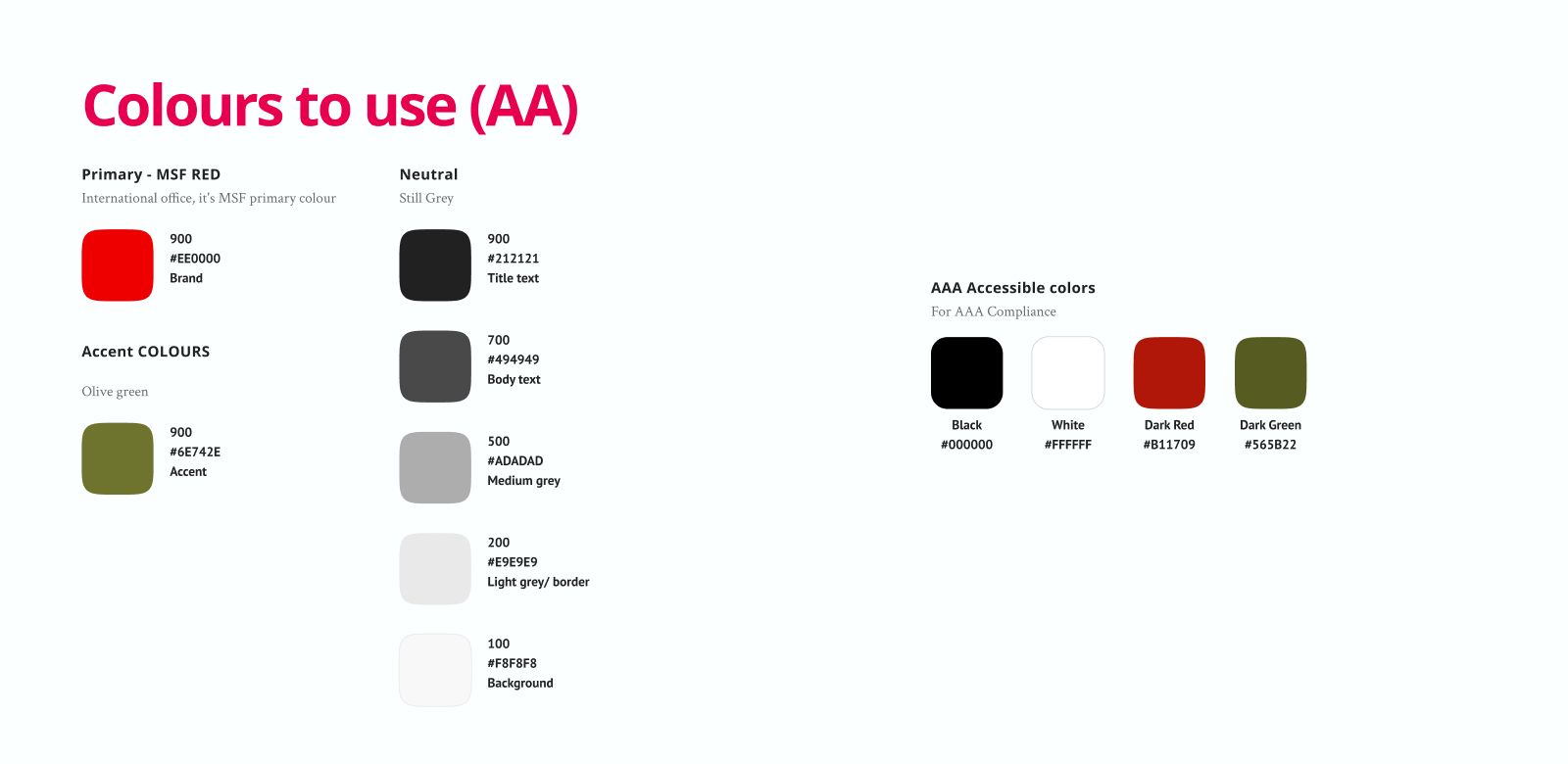
- Accessible colours. MSF’s international brand red #EE0000 from the Figma library (4.53:1 on white) replaces #FF2814 (3.77:1). Dark red #B11709 and dark green #565B22 (7:1) are there for AAA.
- Moving content you can stop. Carousels get a visible pause button and numbered pages.
- Know where you are. Breadcrumbs on every page below the homepage.
- One system. Cards, buttons, forms and sections come from one library, so a fix in one component fixes it everywhere.
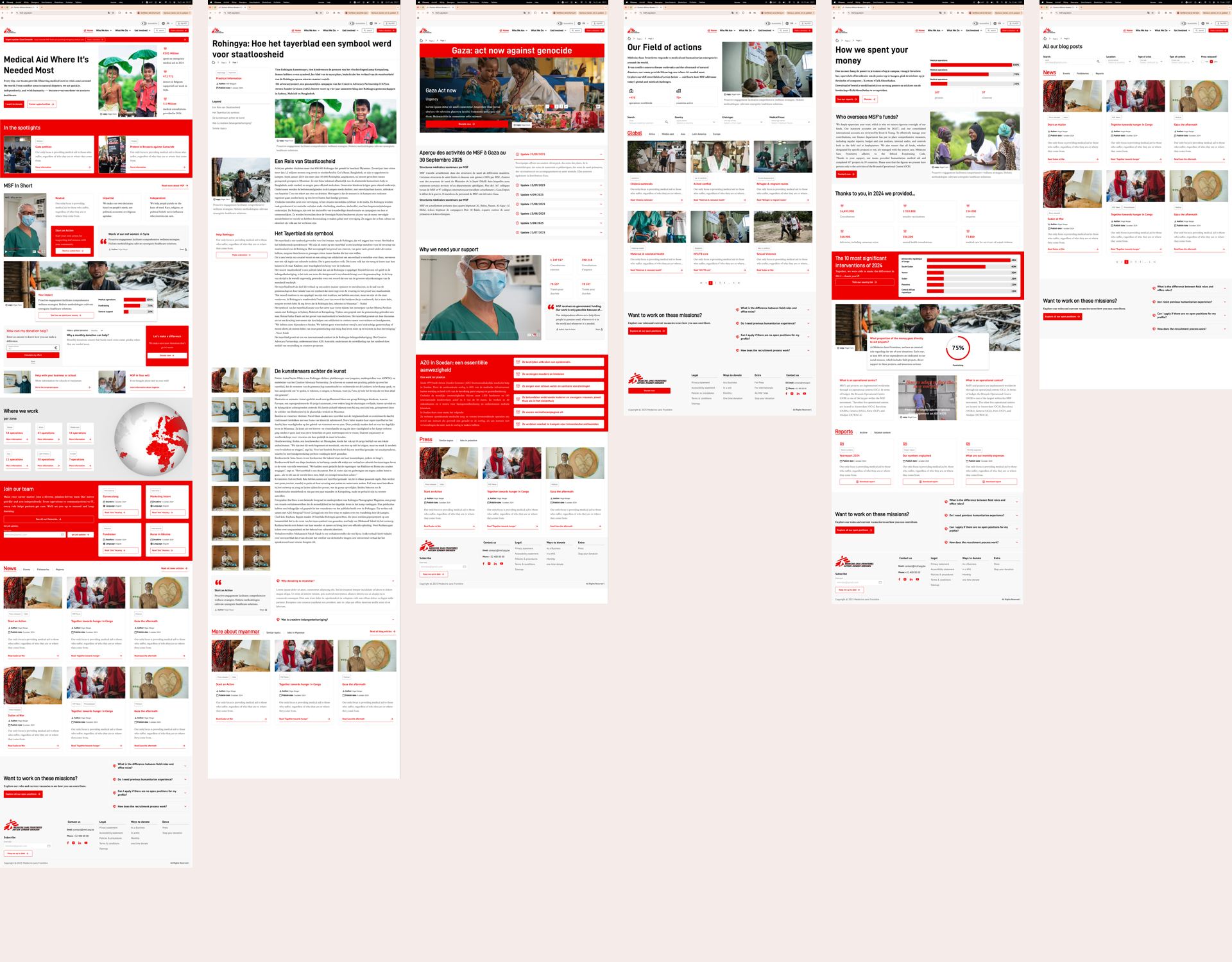
| Template | Variants |
|---|---|
| Homepage | Desktop and mobile |
| Article page | Reportage, event, epidemic, country, job, interaction example |
| Blog archive and search | Blog posts, search results |
| Campaign page | Two versions, with a carousel that can be paused |
| Overview page | With filters, with tabs, or both |
| Static page | “How we spent your money” and values, job-related pages |
Every template has a mobile version. They are built from 18 component groups: grid, typography, colours, icons, buttons, utilities, cards, media, charts, forms with pagination and filters, navigation, accordion, hero, tabs, sections, blog sections, a globe and a photo banner for later.
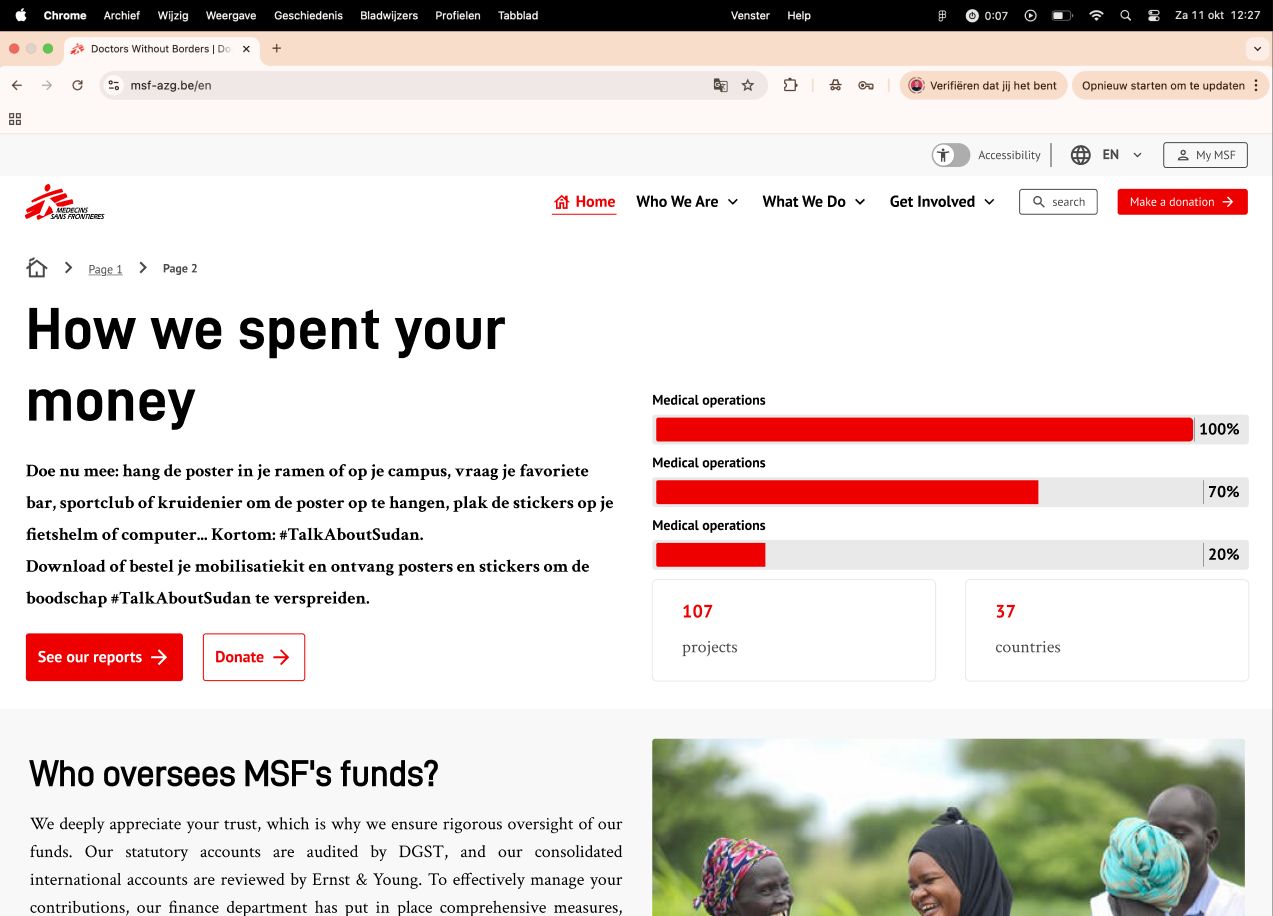
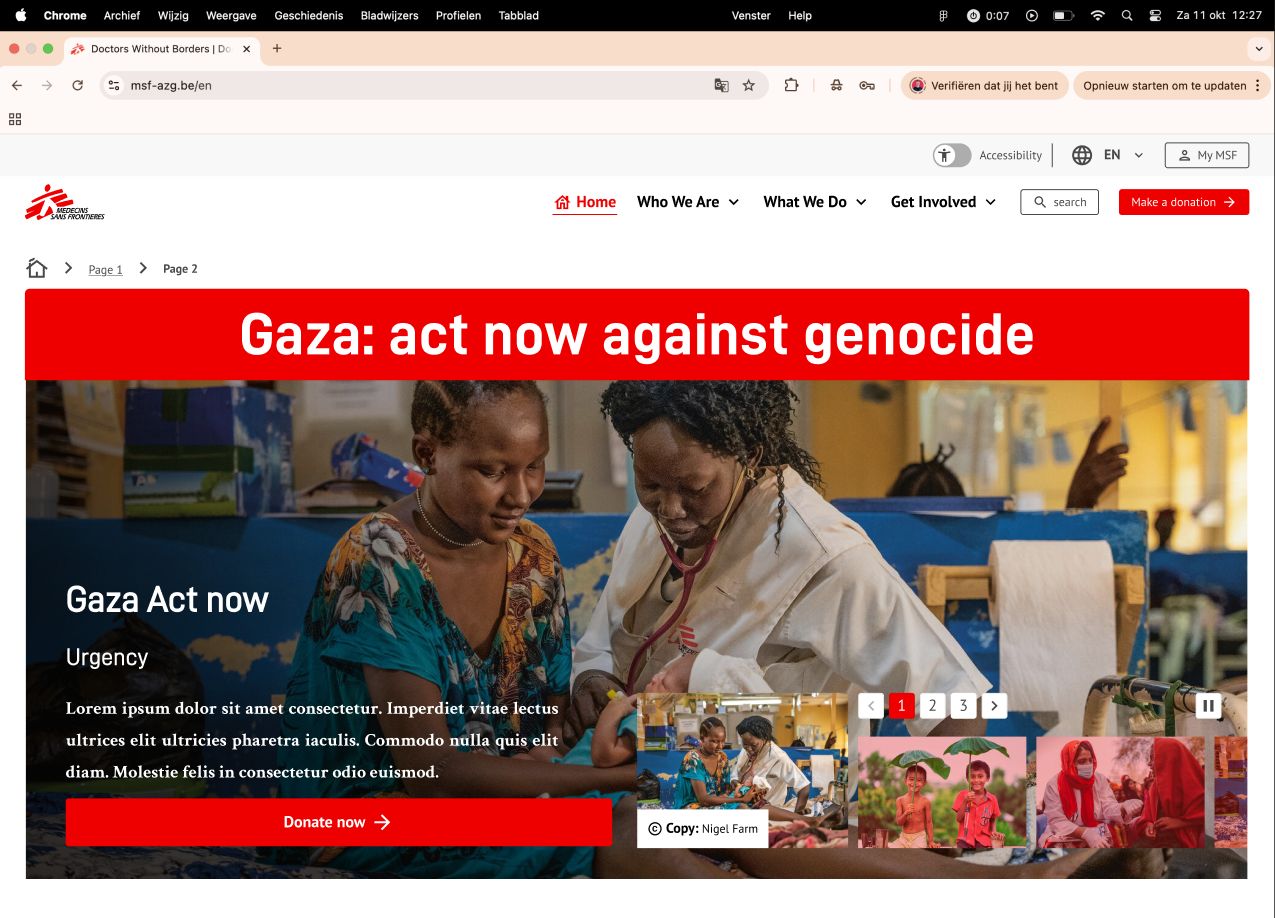
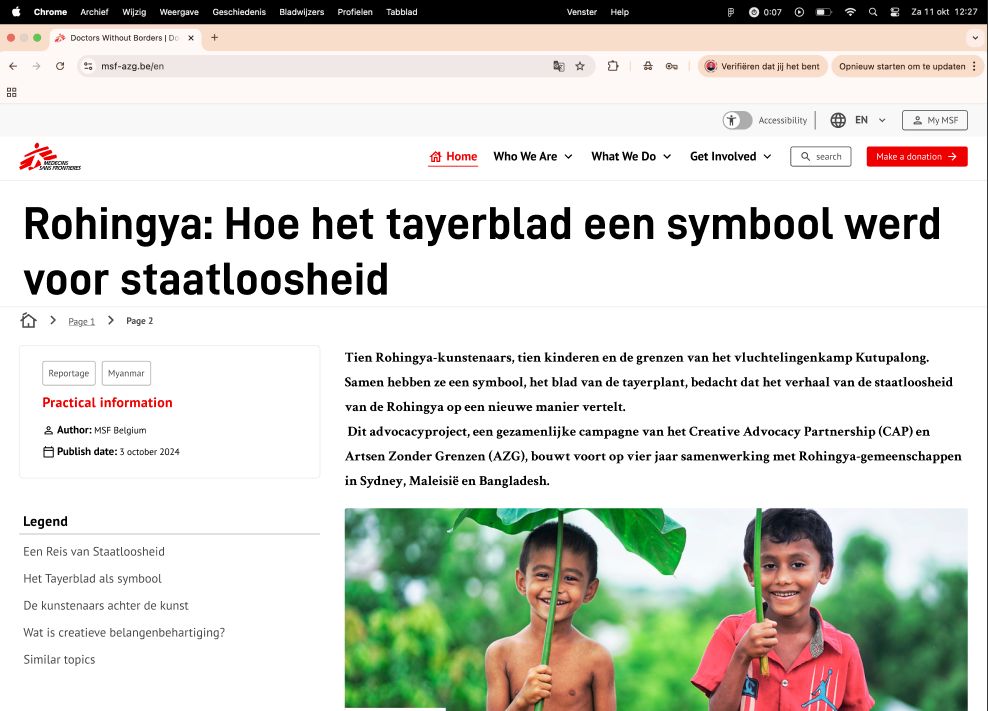
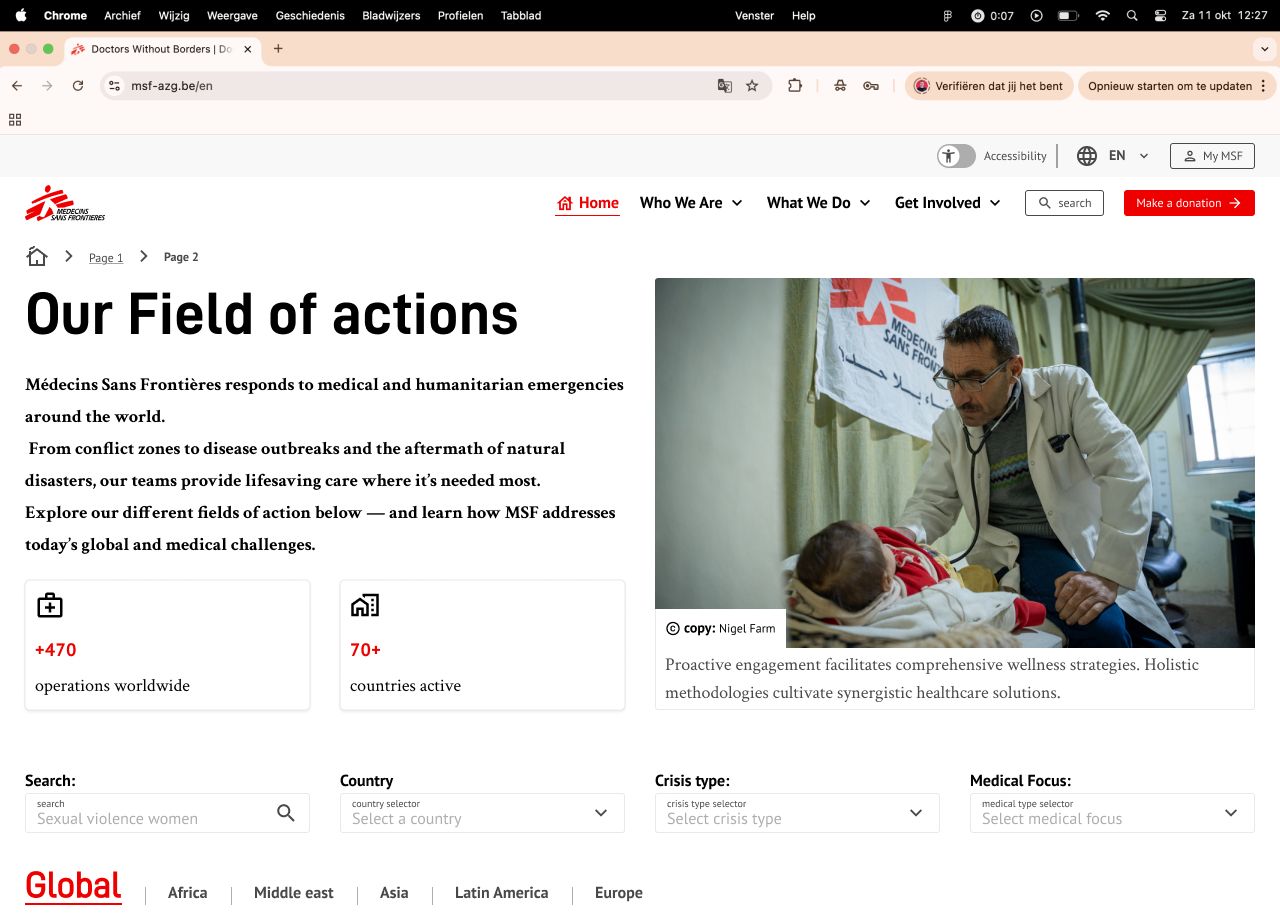
We first tested a design concept in a workshop. Most people felt it leaned too much on images of children and on the idea of one helper and one person in need. MSF wanted it to feel like a community. MSF also wanted reusable components, not a rebuild of the whole library in code. So we started again from scratch.
The accessibility audit
| Standard | WCAG 2.1 AA as the target. WCAG 2.2 criteria and AAA checked as extra guidance. |
|---|---|
| Criteria | 72 success criteria: 30 A, 22 AA, 20 AAA |
| What we tested | Dutch and French website, press site, donation platform, and each component on its own |
| How | Manual checks, keyboard only, VoiceOver, zoom and reflow, WAVE, axe and Lighthouse |
| Output | An observation for 44 criteria, a written fix for 29, 19 criteria first in the action plan, and a fix guide for 29 components |
A fix guide per component
Because the site is built from blocks, we also checked 29 components one by one: buttons, links, cards, the main menu, the language selector, forms, tabs, the timeline, charts, tables and more. Each got its own page: which WCAG criteria it fails, and how to fix it in the code. For example: use a real button for actions and a link for navigation, add aria-expanded to the accordion, give the carousel arrows a name, connect a chart to a table with the same data.
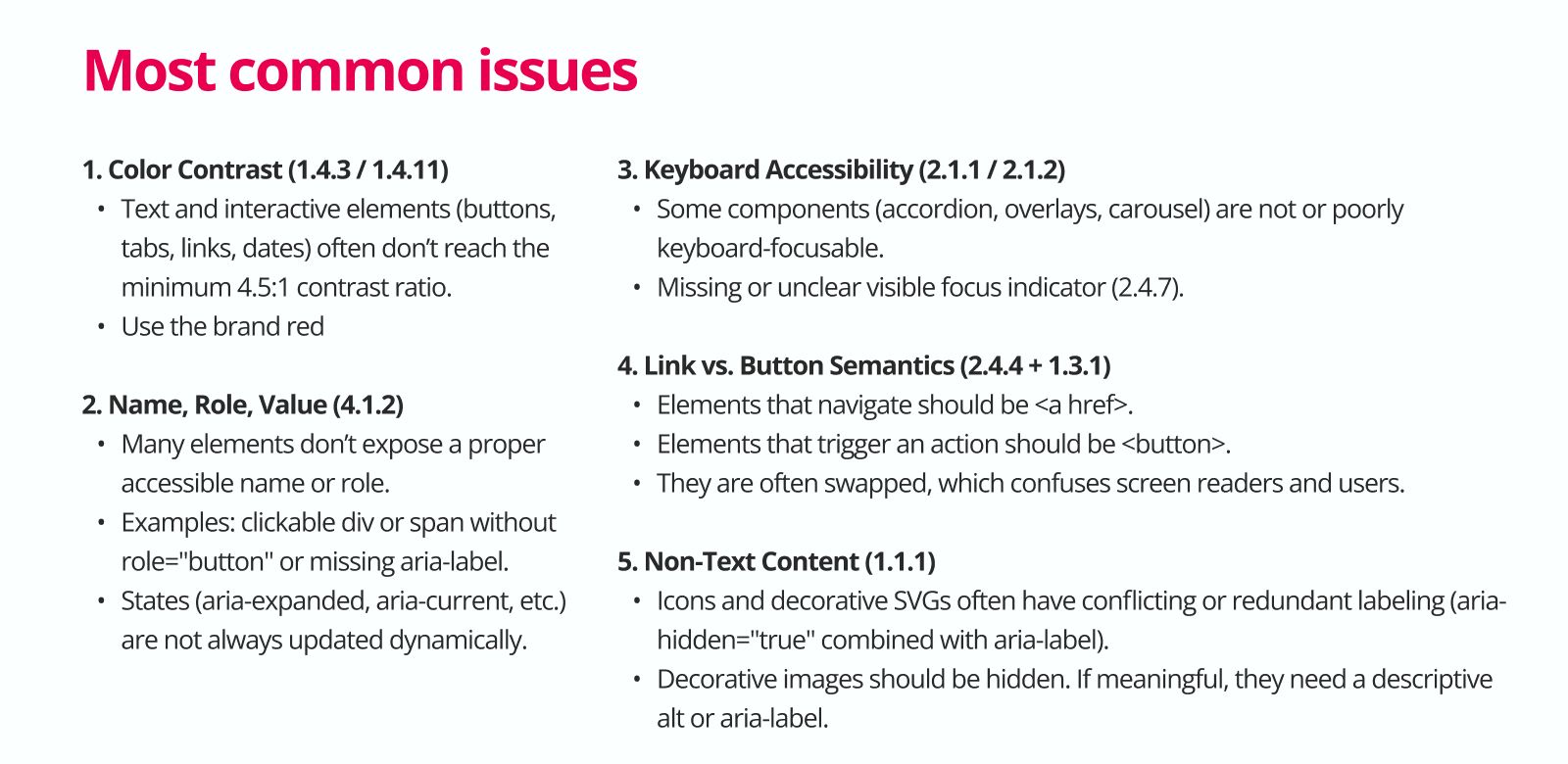
What already worked well: a logical focus order, visible form labels, buttons that act on release, and no keyboard shortcut conflicts.
The SEO scan pointed at the same issues: too many H1 headings, missing meta descriptions, 9 images without alt text and links without text. Good accessibility and good findability often need the same fixes.
Testing with people
We planned usability tests with three groups: potential donors, existing donors and disabled people.They did. We tested with colour-blind people and with a neurodivergent team, so that both the stakeholders and possible donors could find their way. One trade-off: every team wanted its own section on the homepage, so it became longer than before. We kept the flow and the structure clear, so the extra length stands out as little as possible.
Handover
MSF received the key findings report, the full audit on the shared board, the fix guide per component, and the Figma file with the component library and the page templates. The fixes are split by who can act on them, so developers and designers can each start right away. The Juwix team designed and coded it together with MSF’s Drupal developer, who knows the existing back end well. That developer now puts everything live, step by step.
The website is being updated now. You can follow it on msf-azg.be.
Deliverables
- Shared research board (FigJam)
- Research request and problem space
- 6 stakeholder interviews with key insights
- Donor interview guide and 2 interviews
- Survey results
- Desk research summary (4 reports)
- Benchmark: MSF Netherlands and France
- 4 personas on the donor journey
- Audit of today’s content formats
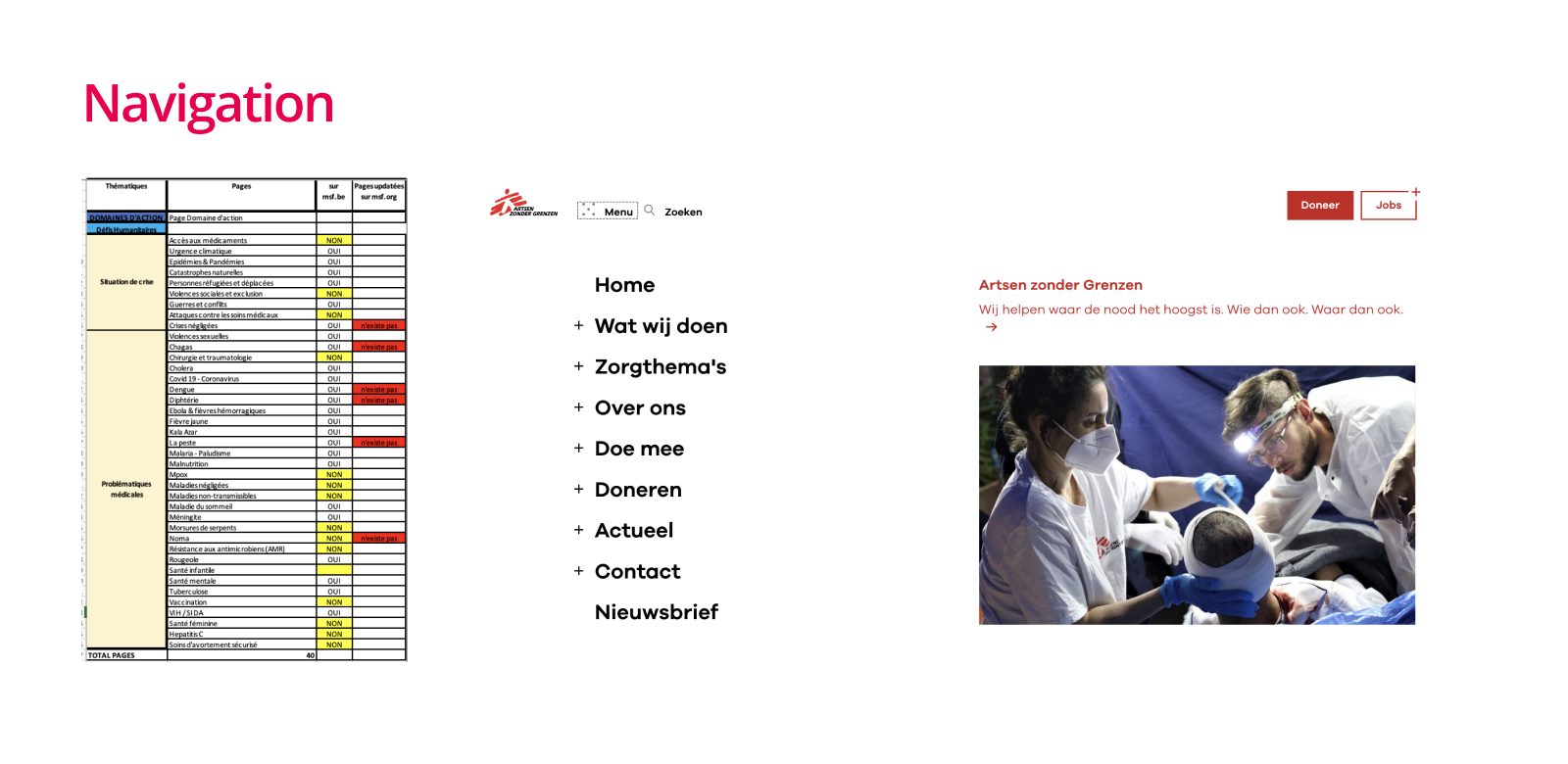
- Inventory of the 40 topic pages
- SEO baseline
- WCAG audit of pages (72 criteria)
- WCAG audit per component
- Action plan for developers and designers
- Key findings report
- Fix guide for 29 components
- Accessible component library (18 groups)
- 6 page templates with variants, desktop and mobile
What we learned
Building one website with many teams involved is hard, especially when it has to work for the people who use it. It took a lot of workshops and meetings to get everyone on board. That matters: a launch only works when every team feels good about it.
Accessibility is still vague for many organisations. MSF wants to be inclusive, and that let us find a good balance: a website that is accessible, informative and works for every stakeholder.
Working on a public or social service?
We do the whole route: research with your team and your users, an audit you can act on, design, and testing with real people. Tell us where you are stuck.
Send a message